Fork me on GitHub

Excel数据导入Mysql

java操作excel将数据导入mysql数据库中

前期准备

1
2
3
4
5
6
7
8
9
10
11
12
13
14
15
16
17
18
19
20
21
22
23
24
25
26
27
28
29
30
31
32
33
34
35
36
37
38
39
40
41
42
43
44
45
46
47
48
49
50
51
52
53
54
55
56
57
58
59
60
61
62
63
64
65
66
67
68
69
70
71
72
73
74
75
76
77
78
79
80
81
82
83
84
85
86
87
88
89
90
91
package javaExcelMysql;
//导入相关的包 mysql
import java.sql.Connection;
import java.sql.DriverManager;
import java.sql.PreparedStatement;
import java.sql.SQLException;
//导入操作Excel的包
import jxl.Sheet;
import jxl.Workbook;
import jxl.read.biff.BiffException;

import java.io.File;
import java.io.IOException;


//excel 读取类
class excelRead{
private static String driver = "com.mysql.jdbc.Driver";
private static String url = "jdbc:mysql://localhost:3306/mydatabase";
private static String user = "root";
private static String password = "123456";
private static Connection con = null;
private static PreparedStatement pstatement=null;
public static void readExcel(File path) throws BiffException, IOException{
//连接数据库
try {
Class.forName(driver);
} catch (ClassNotFoundException e1) {
// TODO Auto-generated catch block
e1.printStackTrace();
}
try {
con = DriverManager.getConnection(url,user,password);
} catch (SQLException e) {
// TODO Auto-generated catch block
e.printStackTrace();
}
if(con!=null) {
System.out.println("sucess connect to mysql");
}
//读取excel数据表
Workbook workbook = Workbook.getWorkbook(path);
Sheet[] sheets = workbook.getSheets();
if(sheets!=null)
{
for(Sheet sheet:sheets)
{
//获取行数
int rows = sheet.getRows();
System.out.println(rows);
//获取列数
int cols = sheet.getColumns();
System.out.println(cols);
//读取数据
for(int row = 2;row<rows;row++) //z这里row从2开始是因为去除了表头占的两行
{
String values[] = new String[3];
for(int col=0;col<cols;col++)
{
//将每行不同列的内容放入数组
values[col] = sheet.getCell(col,row).getContents();
}
//将读取出来的内容写入mysql数据库
try {
pstatement = con.prepareStatement("insert test7 values(?,?,?);");
pstatement.setNString(1, values[0]);
pstatement.setNString(2,values[1]);
pstatement.setNString(3,values[2]);
pstatement.executeUpdate(); //执行sql语句插入内容
} catch (SQLException e) {
// TODO Auto-generated catch block
e.printStackTrace();
}
}
}
}
workbook.close();
try {
con.close();
} catch (SQLException e) {
// TODO Auto-generated catch block
e.printStackTrace();
}
}
}
public class testExcel2Mysql {
public static void main(String[] args) throws BiffException, IOException{
File path = new File("D:\\javaio\\testDataExcel\\test_double.xls");
excelRead.readExcel(path); // 传入要操作的excel路径
}
}

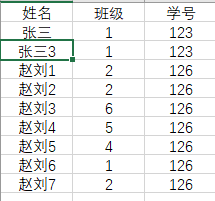
在这里插入图片描述
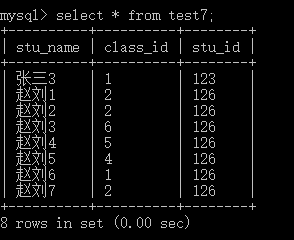
在这里插入图片描述

-------------本文结束感谢您的阅读-------------
Donate comment here